
Introduction
DataFrugal is a cloud backup and data control platform designed for engineering, infrastructure, and operations teams. It provides a unified API surface, web interface, and command-line agent for orchestrating backup, retention, and governed access to data stored on secure object storage backends. DataFrugal operates as a control plane between your applications and underlying storage, focusing on reliable data protection workflows without exposing raw storage SDKs or processing file content. This documentation describes how to integrate, configure, and operate DataFrugal using the UI, REST APIs, and the df-agent for automation.
Rather than exposing raw storage APIs or requiring teams to manage low-level infrastructure details, DataFrugal provides:
- A usage-aligned pricing model designed around protected data volume, not individual API calls or users
- A unified API and command-line interface that enables consistent, automation-friendly data protection workflows across environments
- Centralized visibility and control over protected data using metadata-based insights, without inspecting or processing data content
DataFrugal is designed for engineering, infrastructure, and operations teams that need reliable backup, retention, and governed access to data—without turning storage management into an application concern.
What is DataFrugal?
DataFrugal is a cloud backup and data control platform designed for engineering, infrastructure, and operations teams.
It provides a structured, policy-driven control plane for protecting, retaining, and accessing data stored on secure object storage backends — without exposing raw storage SDKs or requiring teams to manage low-level cloud primitives.
DataFrugal can be used independently or integrated into existing application and system workflows through APIs, the df-agent, and a centralized web interface.
Common use cases include Database backups, VM backups, log archival, compliance snapshots, and long-term data retention. Across these scenarios, DataFrugal provides:
- Usage-aligned pricing based on protected data volume, not per-user licenses or individual API calls
- Centralized visibility and control using metadata-based insights, without inspecting or processing data content
- Policy-driven versioning and retention for reliable recovery and governance
- Enterprise-grade security controls including encryption at rest and in transit, role-based access, and network restrictions
- Large object support for handling individual objects up to 5 TB through platform-managed transfers
With a role-aware UI for operational visibility and REST APIs plus command-line tooling for automation, DataFrugal enables teams to manage backup and retention workflows efficiently — without turning storage management into an application concern.
Key Features & Benefits
- Unified Visibility Across Protected Data: Centralized, metadata-based visibility into protected data across systems, services, and automated workflows — without inspecting data content.
- Usage-Aligned Pricing Model: Pricing scales with the volume of data protected rather than per-user licenses or individual API calls.
- Enterprise-Grade Security Controls: Encryption at rest and in transit, role-based access control, organization- scoped boundaries, and network-level restrictions.
- Role-Aware Administrative Control: Centralized management of users, roles, ownership, and usage visibility through a single policy-driven control plane.
- Secure, Controlled Access Across Environments: Browser-based UI for operational visibility combined with APIs and df-agent support for automation and system-level workflows.
- Policy-Driven Versioning and Retention: Automatic retention of historical object versions based on defined policies, enabling reliable recovery and governance.
- Metadata-Based Search and Discovery: Search and organize protected data using indexed metadata, labels, and source context — without content inspection.
- Built-In Data Protection and Access Controls: Preventive controls that restrict external sharing and reduce exposure through architectural enforcement rather than reactive monitoring.
- Large Object Support: Reliable handling of individual objects up to 5 TB through platform-managed transfers, without exposing underlying storage SDKs.
Getting Started
Welcome to DataFrugal — a cloud backup and data control platform designed for engineering, infrastructure, and operations teams.
This section helps you set up your organization, configure access, and integrate DataFrugal into your environment using the web UI, APIs, or the df-agent.
Getting Started with DataFrugal
DataFrugal supports multiple onboarding paths depending on how your organization manages identity, billing, and cloud infrastructure. All onboarding flows result in a policy-governed environment for protecting and retaining data.
1. Organization-Based Onboarding (Recommended)
An administrator creates an organization, selects a subscription plan, and configures the preferred storage backend and region.
Additional users and service identities can be added using role-based access controls, with permissions scoped according to organizational policies.
This onboarding model is recommended for production workloads, compliance requirements, and long-term data retention.
2. API and Automation-First Onboarding
Infrastructure teams integrating DataFrugal into existing systems can onboard once and extend usage through APIs and the df-agent.
This approach is commonly used for CI/CD pipelines, scheduled backups, and system-generated data workflows.
3. Azure Marketplace Subscription
Organizations running workloads on Microsoft Azure can subscribe to DataFrugal via the Azure Marketplace to align billing with existing cloud accounts.
Subscribing through the marketplace ensures unified billing and avoids duplicate charges across platforms.
For step-by-step setup instructions, see the Getting Started Guide. Additional details are available in the FAQs, or contact support@datafrugal.com.
How to Set Up Your DataFrugal Environment
DataFrugal onboarding is organization-first and designed for production-grade backup, retention, and governed data access.
The setup process establishes an organization, assigns roles, configures the storage backend and region, and enables access through the UI, APIs, or df-agent.
Overview of the Setup Flow
1. Create a DataFrugal account using your organization’s identity provider (email/password, Google, or Microsoft login).
2. Accept the platform terms and receive a default role based on organizational policy.
3. Create or join an organization. Existing organizations may invite users or service identities using role-based access controls.
4. Select a subscription plan aligned with your data protection needs. Usage-based charges apply based on protected data volume.
5. Choose the preferred storage backend and region (for example: Mumbai, Singapore, Virginia).
6. Complete the organization setup and billing configuration.
7. Access the DataFrugal dashboard to begin protecting data using the UI, REST APIs, or df-agent.
Automation & System Integration
For infrastructure-driven workflows, DataFrugal can be integrated using REST APIs or the df-agent without additional UI interaction. This approach is commonly used for scheduled backups, CI/CD pipelines, and system-generated data.
Detailed examples are available in the API documentation and df-agent guide.
For billing-related onboarding via Microsoft Azure, organizations may subscribe through the Azure Marketplace to align charges with existing Azure accounts.
Understanding the Dashboard
Main Dashboard View
The Main Dashboard serves as the default landing view where users can manage their files and folders. This central interface allows you to perform core actions related to file storage, such as uploading, organizing, and performing quick actions on your documents.
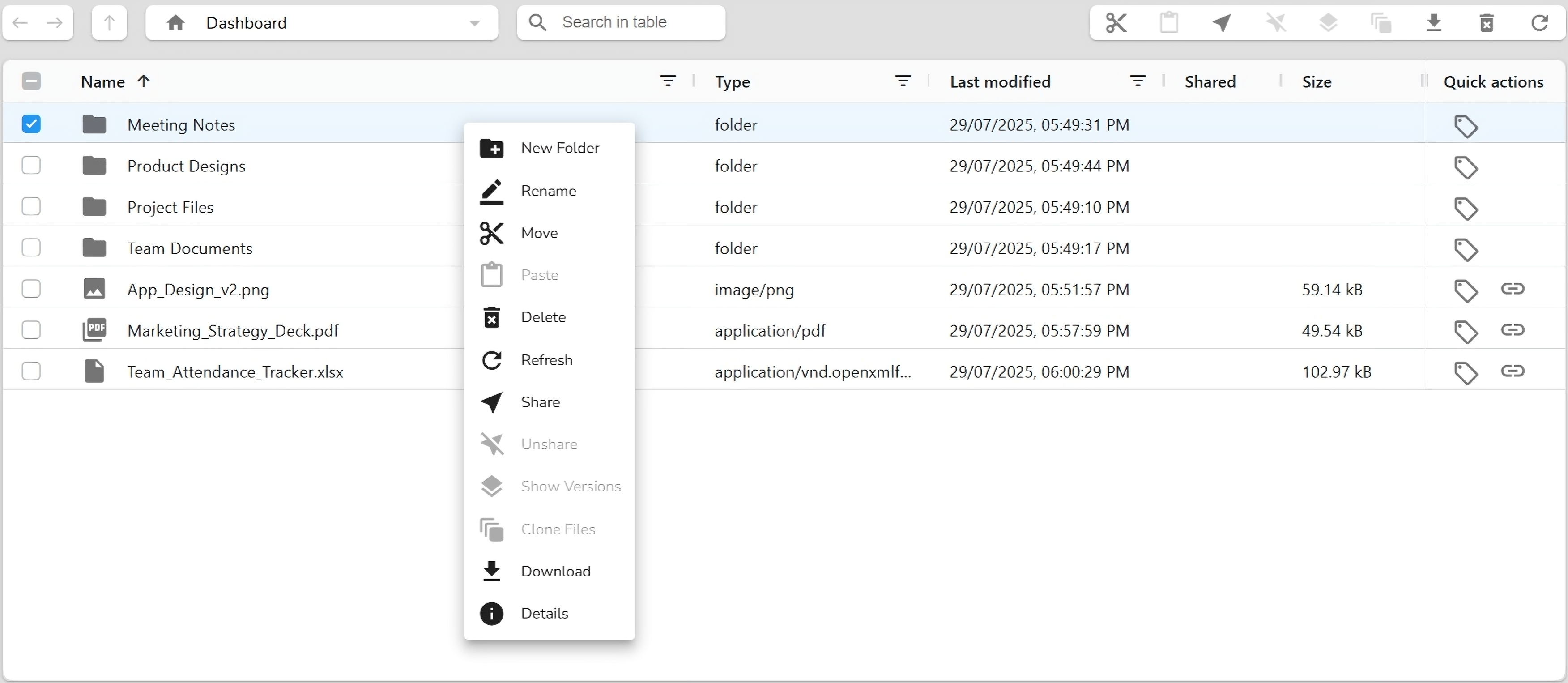
- Upload files by dragging and dropping them directly
- Create new folders to organize your data
- Use quick actions like Rename, Move, Delete, Share, and Refresh
- Search for files or filter them by type, name, or modification date
This view provides full access to storage functionalities, enabling users to manage and interact with their private data effectively.
Shared Items View
The Shared view displays all folders that others have shared with you. This section helps you collaborate with teammates or external users by keeping all shared resources in one accessible location.
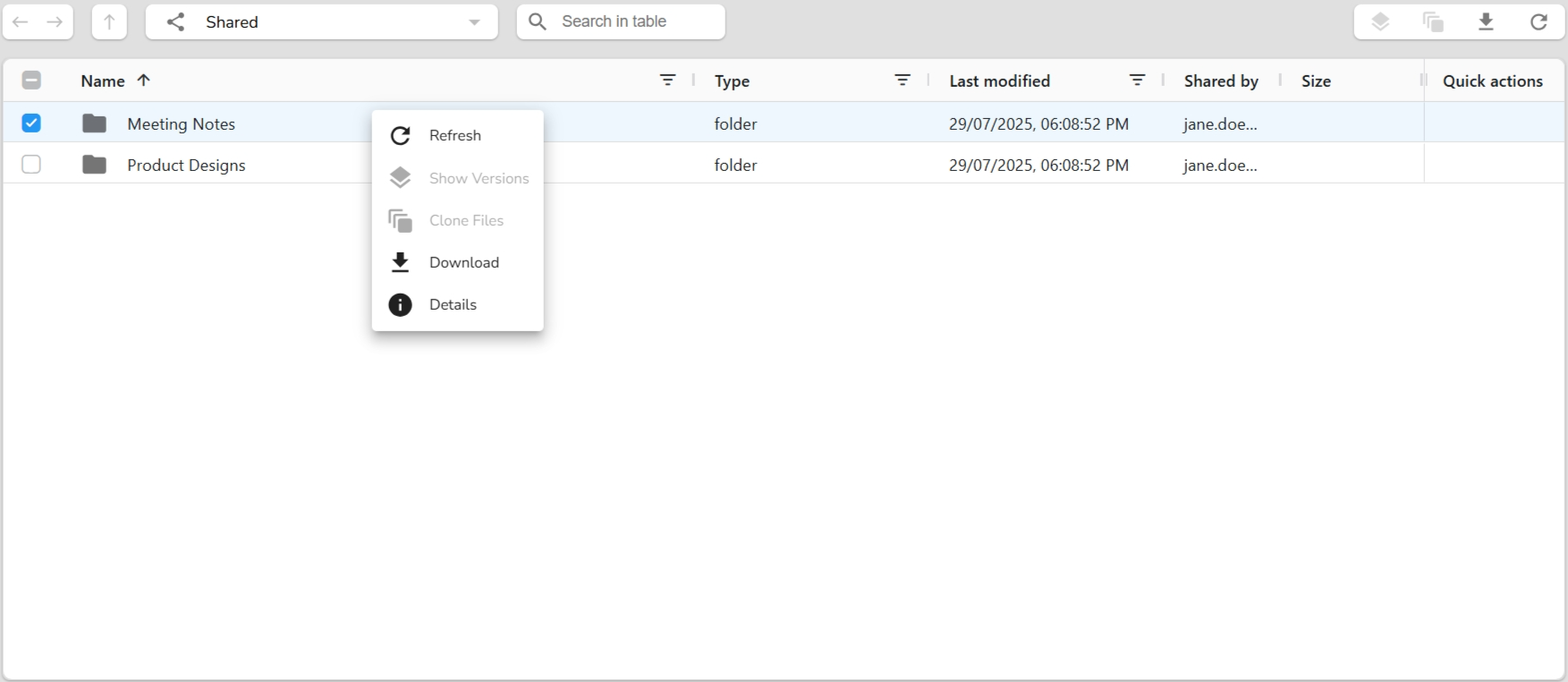
- View items shared with your account
- Use actions like Refresh, Download, Clone, and View Details
- Identify the sharer via “Shared by” column
Only shared folders appear here. If no files are shared yet, this view will remain empty until someone shares a folder with you.
Restore Items View
The Restore dashboard displays all previously deleted items—folders or files that can still be viewed or acted upon. This view helps retrieve deleted content without immediately restoring it.
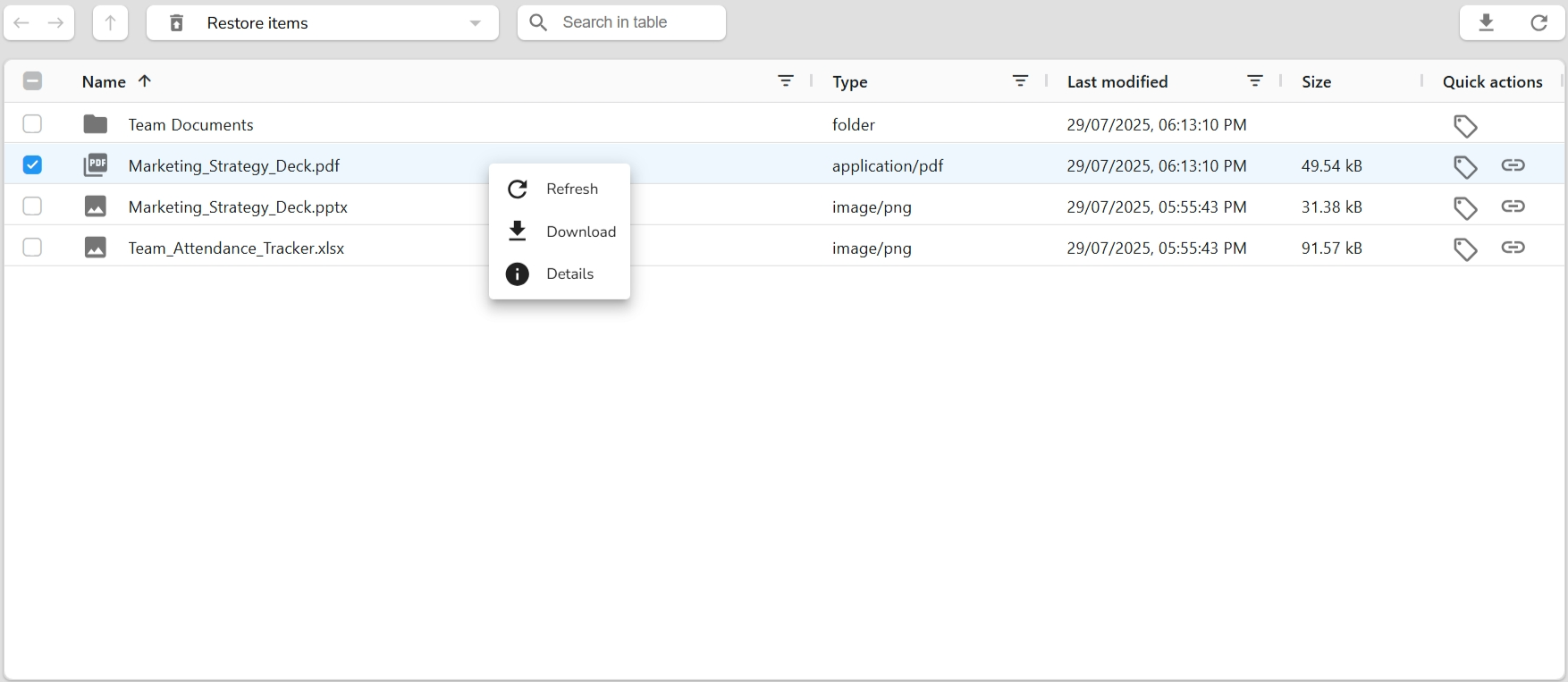
- Browse all deleted folders and files.
- Use Refresh to sync the latest deleted records.
- Download deleted files before permanent removal..
- View Details of any deleted item.
- Use search and filter tools to quickly locate deleted data.
This interface is helpful for reviewing deleted items without restoring them, giving you visibility and control over what's been removed from your drive.
Role-Based Access Control (RBAC)
DataFrugal uses a role-based access control (RBAC) model to ensure users and service identities can only access data and operations required for their responsibilities.
Roles define permissions across data access, administration, billing, and operational visibility. Dashboards and available actions are automatically scoped based on assigned roles.
Supported Roles
- Admin – Manages organizational configuration, access policies, users, and data governance. Limited access to billing.
- Member – Performs operational tasks and accesses permitted data and reports. No administrative or billing privileges.
- Billing – Manages subscriptions, invoices, and usage reporting. No access to data governance or user administration.
Administrative Capabilities
Admin Role
The Admin role governs organizational setup and access policies. Admins are responsible for defining who can access data and how it can be used.
- Organization Management – Configure organization details, ownership, and access boundaries.
- Role & Policy Management – Assign roles, define access scopes, and manage RBAC policies.
- Access Delegation – Grant scoped access to users or service identities for controlled data access.
- Security Controls – Manage IP allowlists, access restrictions, and governance settings.
Member Capabilities
The Member role is designed for operational users and systems that interact with protected data within defined access scopes.
- Data Operations – Upload, download, and access data within assigned permissions.
- Operational Visibility – View reports and dashboards relevant to assigned data and workflows.
Billing Capabilities
The Billing role is scoped to financial and usage oversight without access to operational data or administrative controls.
- Subscription Management – View and manage active plans and billing methods.
- Invoice & Payment Access – View invoices and payment history.
- Usage Reporting – Access usage and cost-related reports for financial tracking.
Data Protection with WORM
Protect your business-critical data with immutable storage, intelligent retention policies, and governed administrative controls.
DataFrugal helps organizations secure backups, archives, compliance records, and sensitive business files using WORM (Write Once, Read Many) technology. Combined with configurable retention policies and a secure Break Glass approval workflow, DataFrugal ensures your data remains protected from accidental deletion, malicious modification, ransomware attacks, and unauthorized access.
Whether data is uploaded through the DataFrugal Dashboard or automated using df-agent, the same WORM protection and retention policies are consistently enforced across the platform.
What is WORM (Write Once, Read Many)?
WORM (Write Once, Read Many) is an immutable storage technology that allows data to be written once and read any number of times without being modified or deleted until the configured retention period expires.
Once WORM protection is applied, DataFrugal prevents any changes to the protected object for the entire retention duration, ensuring the original data remains authentic, tamper-proof, and recoverable.
WORM is commonly used for:
- Backup protection
- Long-term archival
- Regulatory compliance
- Financial records
- Healthcare data
- Legal evidence
- Business-critical documents
How WORM Works in DataFrugal
When uploading a file, users can enable WORM Retention directly from the DataFrugal Dashboard by selecting a retention period before completing the upload.
For automated workflows, the same protection can be applied using the DataFrugal Agent (df-agent) during file upload.
Once uploaded with WORM enabled:
- The object becomes immutable.
- It cannot be modified.
- Protection remains active until the retention period expires.
These rules are enforced automatically by DataFrugal, regardless of how the object is accessed.
Key Benefits of WORM
- Protects data from accidental deletion
- Prevents unauthorized modifications
- Preserves original versions of important files
- Creates tamper-proof audit evidence
- Improves disaster recovery readiness
- Helps meet regulatory and compliance requirements
- Ensures long-term integrity of archived data
Understanding Retention Policies
A Retention Policy defines how long an object must remain protected.
While retention is active:
- Files cannot be deleted.
- Files cannot be modified.
- Protected versions remain immutable.
- Every access follows organizational security policies.
After the retention period expires, the object can be managed according to your organization's standard lifecycle or deletion policies.
What is Ransomware?
Ransomware is malicious software that encrypts, corrupts, or deletes an organization's data to prevent access until a ransom is paid.
Modern ransomware attacks frequently target:
- Production data
- Backup repositories
- Snapshots
- Archive storage
If attackers successfully delete or encrypt backups, organizations may lose their ability to recover critical information.
How WORM Protects Against Ransomware
DataFrugal WORM provides an additional layer of protection by making protected data immutable.
Even if an attacker gains access to user credentials or administrative systems, WORM-protected objects cannot be changed or deleted before retention expires.
Benefits against ransomware include:
- Immutable backup copies remain intact.
- Clean recovery points are always available.
- Backup deletion attempts are automatically blocked.
- Insider threats have limited impact.
- Compromised accounts cannot remove protected data.
What is Break Glass?
Break Glass is DataFrugal's secure, approval-based exception process for removing WORM retention from a protected object before its retention period expires.
Normally, WORM protection cannot be bypassed.
However, approved business requirements may occasionally require retention to be removed before it expires. Instead of allowing direct deletion, DataFrugal requires an authorized approval process that is fully documented and audited.
Break Glass ensures exceptional requests are carefully controlled without compromising overall data protection.
Why is Break Glass Needed?
Strong security should never prevent valid business operations.
Break Glass provides a controlled mechanism for exceptional situations while preserving governance and accountability.
It helps organizations:
- Prevent unauthorized retention overrides
- Ensure administrative review before removing protection
- Maintain complete audit records
- Reduce insider risk
- Meet compliance requirements
- Preserve trust in immutable storage
When Should Break Glass Be Used?
Break Glass should only be used in exceptional business situations, including:
- Sensitive information uploaded accidentally
- Incorrect files requiring approved removal
- Legal or regulatory instructions requiring early deletion
- Administrative cleanup approved by authorized personnel
- Business exceptions documented through organizational policy
Break Glass Workflow
When someone attempts to delete a WORM-protected object before its retention period expires, DataFrugal automatically blocks the operation and starts the governed Break Glass process.
Step 1 — Delete Request
A user attempts to delete a protected object.
Since WORM retention is active:
- DataFrugal blocks the deletion.
- The user is informed that the object is under retention.
- The user may submit a Break Glass request.
The request includes:
- Business justification
- Target file or object version
- Reason for removal
- Two designated System Administrator approvers
Step 2 — Administrative Approval
The selected System Administrators receive the Break Glass request.
Each administrator independently reviews:
- Business justification
- Object information
- Compliance considerations
- Security impact
Possible outcomes:
- Approve
- Reject
Both administrators must approve before retention can be removed.
If either administrator rejects the request:
- The request is closed.
- WORM protection remains active.
- No changes are made.
Step 3 — Retention Update
After receiving dual approval:
- DataFrugal removes WORM retention only for the approved object version.
- All other protected objects remain unchanged.
- The approved object becomes eligible for deletion if no additional retention rules apply.
This ensures the approval affects only the requested resource and never the entire storage environment.
Step 4 — Audit Logging
Every Break Glass action is permanently recorded.
The audit history includes:
- Requested by
- Business justification
- Approving administrators
- Object name
- Object version
- Request timestamp
- Approval timestamp
- Retention removal event
- Final outcome
- Delete operation (if performed)
Break Glass at a Glance
- Secure approval-based retention override
- Two System Administrator approvals required
- Object version-specific protection removal
- No impact on other protected data
- Complete audit trail
- Integrated with WORM governance
- Role-based access control
- Enterprise-grade security and compliance
Dashboard User Experience
DataFrugal provides an intuitive interface for managing WORM-protected data.
During Upload
Users can:
- Upload files through the Dashboard
- Enable WORM protection
- Configure the required retention period
- Complete the upload with immutable protection enabled
During File Management
When viewing protected objects:
- WORM-protected files are clearly identified.
- Retention status is visible.
- Remaining retention period can be reviewed.
- Delete actions are automatically restricted while retention is active.
If Deletion is Attempted
Instead of deleting the object immediately:
- DataFrugal blocks the delete request.
- A Break Glass request option is presented.
- The approval workflow begins.
- Authorized administrators review the request.
- The decision is fully audited.
This provides a seamless user experience while maintaining enterprise-grade governance.
Enterprise Security and Compliance
DataFrugal combines immutable storage with governed administrative workflows to protect critical business data throughout its lifecycle.
By integrating WORM, Retention Policies, Break Glass Approval, and Comprehensive Audit Logging, organizations can:
- Protect backups from ransomware
- Prevent accidental or malicious deletion
- Preserve regulatory records
- Enforce organizational governance
- Demonstrate compliance during audits
DataFrugal delivers secure, immutable, and fully auditable data protection designed for modern enterprises that require both operational flexibility and uncompromising data integrity.
Quickstart Guide - API Access
Jumpstart your integration with DataFrugal using our
developer-friendly REST API. Visit the
API Access section for essential
curl examples to help you get up and running
quickly. Learn how to create folders, upload files using
Multipart Upload, and automate key operations in your data
pipeline—all through simple and secure API calls.
Usage Overview
DataFrugal provides secure, controlled mechanisms for uploading, downloading, accessing, and duplicating data using both the web interface and automation-friendly tooling.
The platform is designed to support operational workflows for engineering and infrastructure teams while remaining intuitive for users who prefer a visual interface.
Uploading Data
Data can be uploaded securely using the web interface or the command-line agent. Uploads are encrypted in transit and handled using resumable, chunked transfers where applicable.
1. Upload via Web Interface
Use the DataFrugal dashboard to upload files or folders using drag-and-drop or file selection. Upload progress and errors are clearly surfaced in the interface.
2. Upload via Command-Line Agent
The df-agent enables uploads from the
terminal and is suitable for automation, batch transfers,
and scheduled jobs.
3. Upload Failure Handling
Failed uploads are reported with descriptive error messages. Partial uploads can be retried without restarting the transfer, depending on the operation and file size.
Downloading Data
Data can be downloaded through the UI, the command-line agent, or generated cURL commands, depending on access permissions.
1. Download via Web Interface
Users can download permitted files or folders directly from the dashboard. Version awareness and integrity checks are applied automatically.
2. Download via Command-Line Agent
Infrastructure and DevOps teams can download data using
the
df-agent for automation and system-level
workflows.
3. Download via cURL
Secure, time-bound cURL commands can be generated from the UI to allow direct file downloads from a terminal. Each command includes a pre-validated, short-lived access token and is intended for one-time, user-initiated execution rather than automated or unattended workflows.
1. Access Delegation via UI
Administrators and authorized users can grant access to folders through the dashboard. Access is scoped and auditable.
2. Access Delegation via CLI
The command-line agent can be used to grant or consume scoped access programmatically, enabling system-to-system workflows.
Common cURL Actions
DataFrugal provides pre-generated cURL templates for common operations such as uploads, downloads, and authenticated access. These commands can be copied directly from the UI for scripting and automation.
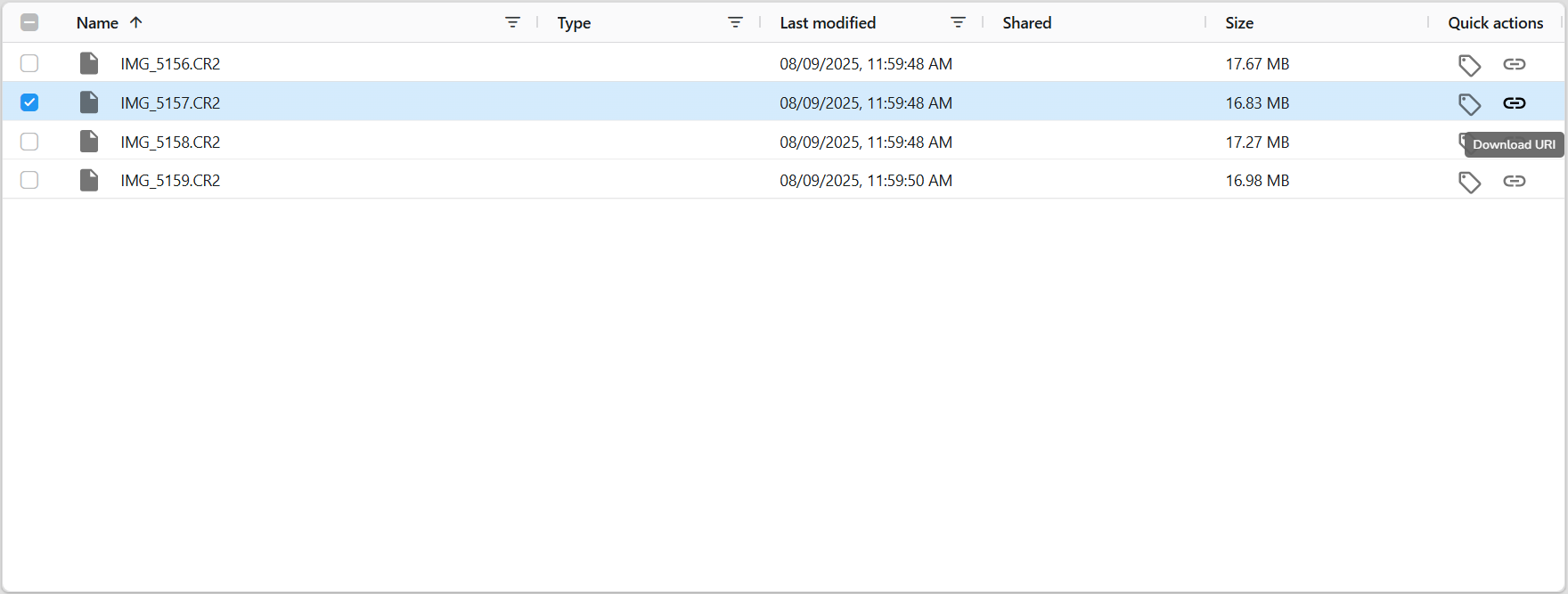
Clone
Clone creates an independent copy of a file that has been shared with you, allowing you to take ownership and manage it within your own workspace.
When a clone is created, a new object is generated under the current user’s ownership and becomes visible in their dashboard. The cloned data is no longer dependent on the original owner’s access permissions.
Clone is designed for controlled duplication within the same environment and does not perform cross-region, cross-vault, or infrastructure-level replication.
Integrations
DataFrugal is designed to integrate into enterprise environments through APIs, command-line tooling, and identity-aware access controls. It acts as a control layer for backup, retention, and governed data access workflows without exposing raw storage SDKs.
df-agent (Command-Line Agent)
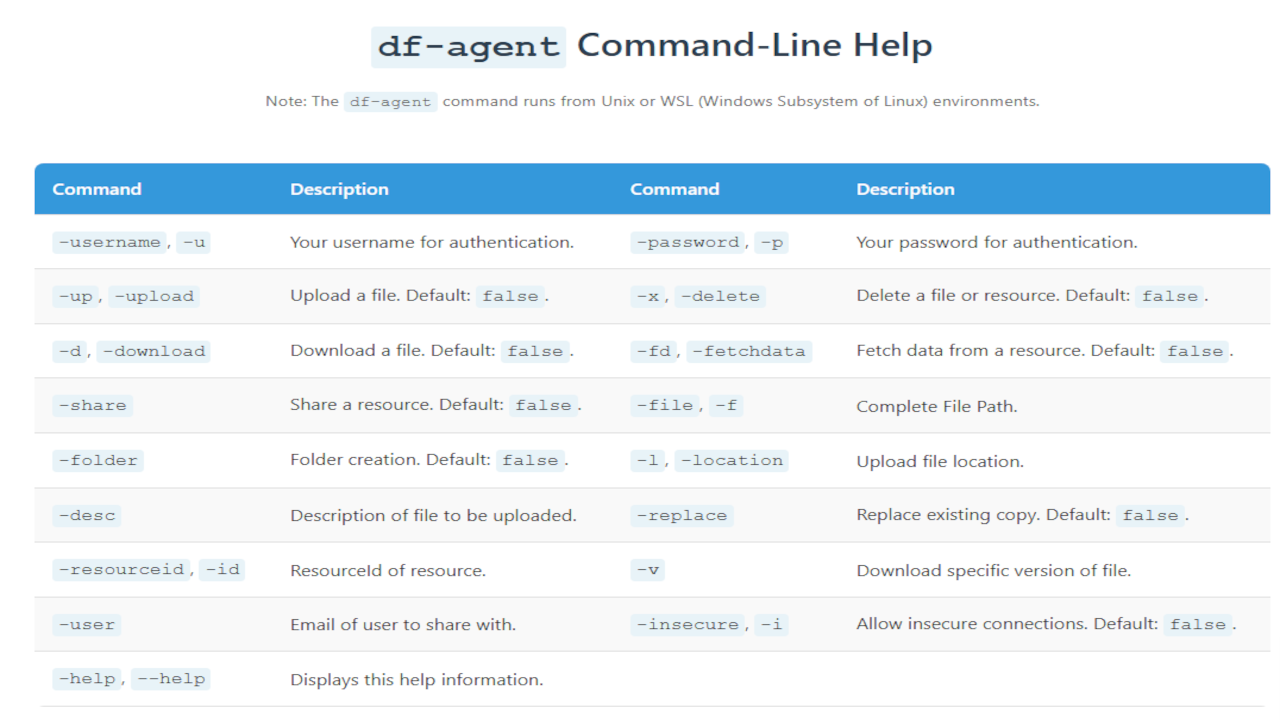
df-agent is a Linux-compatible CLI tool that
interacts with DataFrugal using authenticated APIs. It is
designed for automation, system-to-system workflows, and
scheduled backup operations.
- Upload, download, delete, and share files and folders — including full directory trees
- Create folders, list dashboard resources, replace versions, and apply WORM retention
- Enables secure service-to-service access with scoped read or write permissions
- Designed for CI/CD pipelines, scheduled jobs, and infrastructure automation
-
Authenticates via HTTPS using
Service Identity
credentials (
-sid/-secret) or interactive user login -
Built-in help available via
./df-agent --help
Installation
Build and run the agent from source using the following prerequisites:
- Java 8 or later
- Maven
- df-core-api SDK
Command Examples
Dashboard
Lists dashboard resources.
./df-agent -sid <service-id> -secret '<secret>' -fdUpload File
Uploads a single file to the specified folder.
./df-agent -sid <service-id> -secret '<secret>' -up -f file.pdf -l <folder-id>Create Folder
Creates a new folder under the specified parent location.
./df-agent -sid <service-id> -secret '<secret>' -up -folder -f "Images" -l <parent-folder-id>Upload Directory
Uploads an entire directory while preserving its structure.
./df-agent -sid <service-id> -secret '<secret>' -up -f ./Documents -l <folder-id>Upload with WORM Retention
Uploads a file and applies WORM retention.
./df-agent -sid <service-id> -secret '<secret>' -up -f report.pdf -crt 7yDownload
Downloads a resource using its ID.
./df-agent -sid <service-id> -secret '<secret>' -d -id <resource-id> -f ~/DownloadsDelete
Deletes a file or folder.
./df-agent -sid <service-id> -secret '<secret>' -x -id <resource-id>Share
Shares a resource with another user.
./df-agent -sid <service-id> -secret '<secret>' -share -id <resource-id> -user colleague@example.com
For machine-to-machine authentication, use a
Service Identity with
-sid and -secret instead of
personal login credentials.
Service Identity
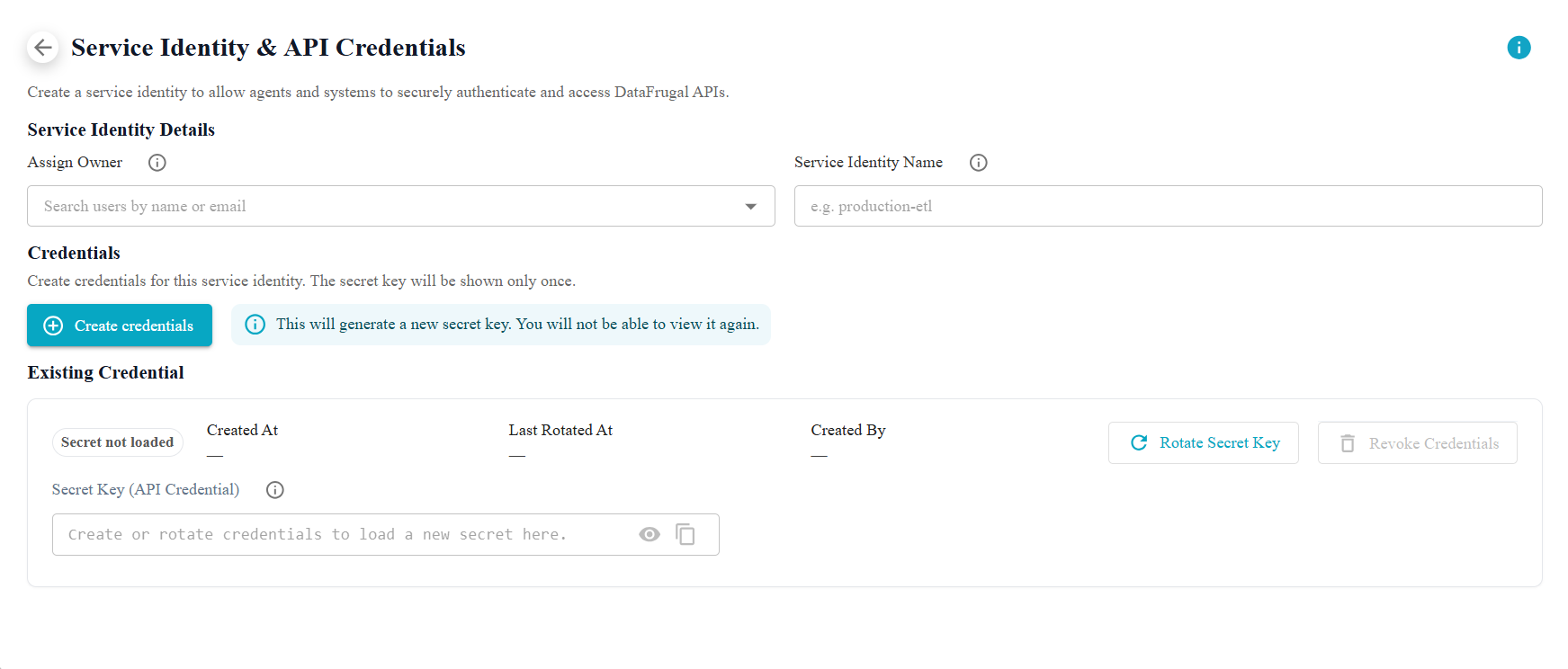
Service Identity is the recommended authentication model for machine-to-machine communication — including agents, cron jobs, background services, and CI/CD pipelines. Service identities are scoped credentials that can be rotated, revoked, and audited independently of human user accounts.
Managing Credentials
Administrators create and manage service identities from the DataFrugal dashboard:
- Log in as a System Administrator.
- Open Settings → Service Identity & API Credentials.
- Assign an owner responsible for the identity.
- Enter a Service Identity name — this becomes the -sid value in df-agent.
- Click Create credentials — copy the secret immediately; it is shown once only.
- Use Rotate to issue a new secret (old secret stops working immediately).
- Revoke identities that are no longer required.
UI → CLI Mapping
Credentials created in the dashboard map directly to df-agent flags:
| UI Field | CLI Flag | Description |
|---|---|---|
| Service Identity Name | -sid |
Machine identity username |
| Secret Key | -secret |
Machine identity secret |
Always pass -sid and
-secret together when authenticating.
Machine Authentication API
Under the hood, df-agent authenticates service identities via the machine-user auth endpoint:
POST /ext/v1/df/machine-user/auth

{
  "username": "<sid>",
  "dfSecret": "<secret>"
}
See the df-agent guide for command examples and the API documentation for full endpoint details.
REST API Access
DataFrugal exposes a RESTful API for integrating backup, retention, and controlled data access workflows into applications and systems.
- Endpoints for object operations, metadata management, and access delegation
- Supports scoped access between services using role- and policy-based controls
- Interactive Swagger UI for exploration and testing
- Secure token-based authentication
- Designed for automation and system-to-system integration
Identity Provider Integration
DataFrugal integrates with external identity providers for authentication, allowing organizations to manage access using existing identity systems.
- Supports Google and Microsoft OAuth-based authentication
- Organization-scoped and role-based access boundaries
- Suitable for both human users and service identities
Backup Tool Integration
DataFrugal can be integrated with external backup and
scheduling tools by invoking APIs or
df-agent as part of existing workflows.
- Commonly used with tools such as Bacula for orchestrated backups
- Enables secure, HTTPS-based data transfer between systems
- Supports controlled access where downstream systems can read protected data without broad permissions
Security and Access Controls
- Role- and policy-based access delegation for users and service accounts
- Network-level restrictions such as IP allowlists
- Encryption at rest and in transit using industry standards
- Support for customer-managed encryption key configurations where applicable
These integrations allow DataFrugal to support enterprise-grade system-to-system data sharing, automation, and backup workflows while maintaining strict access boundaries and governance controls.
Billing & Plans
DataFrugal billing is designed for engineering and infrastructure teams, with pricing aligned to data protection usage rather than individual users or devices.
This section explains how subscriptions are structured, how usage-based charges are applied, and how organizations can manage billing and invoices through the platform.
Subscription Plans
DataFrugal plans combine a fixed platform subscription with usage-based charges based on the volume of data protected.
Subscription tiers differ by included capabilities and supported deployment options. Detailed rate cards and backend-specific pricing are available upon request.
For an overview of available plans and included capabilities, visit the Pricing page.
Usage and Charges
Usage is measured periodically based on protected data volume and operational activity. Pricing scales predictably as data grows and does not depend on the number of users or automation agents.
Invoice Management
Administrators can view invoices, payment history, and billing details directly from the DataFrugal dashboard.
For assistance with billing updates such as tax information, billing contacts, or invoicing questions, the DataFrugal support team is available to help.
For detailed pricing, backend-specific charges, or custom billing arrangements, please refer to the Pricing FAQ or contact support.
FAQ
For more information, visit the full FAQ section at www.datafrugal.com.
Support
Need help or have a question? We’re here to support you:
- Email us:support@datafrugal.com
- Want a faster way to reach us? Just fill out our contact form and we’ll get back to you shortly.
Feature Requests
Have ideas to improve our platform? We welcome your suggestions and prioritize them based on demand and feasibility.
Submit a Support Ticket
For technical issues, bug reports, or assistance, please submit a ticket using our online support form.